

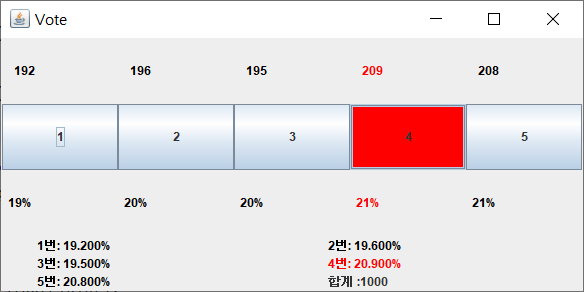
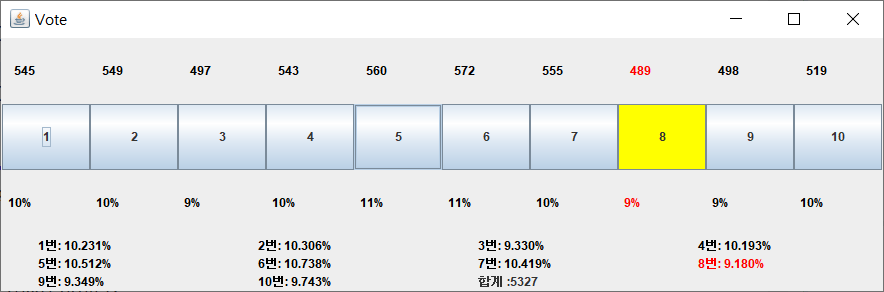
투표 인원 최대 10명
투표 프로그램, 투표 시뮬레이션 지원
package test;

import javax.swing.*;
import java.awt.*;
import java.awt.event.ActionEvent;
import java.awt.event.ActionListener;
import java.util.ArrayList;

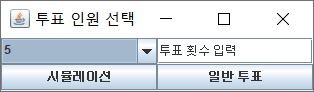
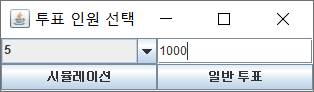
// 투표 인원, 시뮬레이션 유무를 묻는 임시 윈도우
class semiFrame extends JFrame{
	  int receive; // 투표 인원
	  int num=0; // 투표 횟수

	  public semiFrame(){
	    setDefaultCloseOperation(EXIT_ON_CLOSE);
	    setSize(330,100);
	    setLocation(700,300);
	    setLayout(new GridLayout(2,2));
	    setTitle("투표 인원 선택");

	    // 투표 인원 선택 (콤보 박스)
	    String[] st= {"2","3","4","5","6","7","8","9","10"};
	    JComboBox cb=new JComboBox(st);
	    cb.setSelectedIndex(3);
	    add(cb);

	    // 투표 횟수 선택 (텍스트필드)
	    JTextField num_field=new JTextField();
	    num_field.setText("투표 횟수 입력");
	    add(num_field);

	    JButton bt=new JButton("시뮬레이션");
	    JButton bt2=new JButton("일반 투표");
	    add(bt);
	    add(bt2);

	    setVisible(true);

	    // 시뮬레이션 버튼
	    bt.addActionListener(e->{
		    receive=Integer.parseInt((String) cb.getSelectedItem()); // 사용자가 선택한 투표 인원
	    	try {
	    		int num=Integer.parseInt((String)num_field.getText());
			    voting v=new voting(receive,num);
			    v.simulation(num);
	    	}
	    	catch(Exception e1) {
	    		System.out.println("투표 횟수가 정해지지 않았습니다!");
			    voting v=new voting(receive,0);
	    	}
		     setVisible(false);
		 });

	    // 일반 실행 버튼
	    bt2.addActionListener(e->{
		    receive=Integer.parseInt((String) cb.getSelectedItem()); // 사용자가 선택한 투표 인원
	    	try {
	    		int num=Integer.parseInt((String)num_field.getText());
			    voting v=new voting(receive,num);
	    	}
	    	catch(Exception e1) {
	    		System.out.println("투표 횟수가 정해지지 않았습니다!");
			    voting v=new voting(receive,0);
	    	}
	    	setVisible(false);
	    });

	 }
}

public class voting extends JFrame{

	/////////////////////////////////////////////////////////////
	/* 멤버  선언 */

	// 사용자가 처음에 정한 투표 인원
	int choice=0;

	// 위젯 담는 패널 객체
	JPanel panel1=new JPanel();
	/* {1. vote(투표 수)를 나타내는 위젯,
	    2. 버튼(투표 버튼),
	    3. vote2(퍼센트)를 나타내는 위젯
	   }을 배치 */
	JPanel panel2=new JPanel(); // {정보를 나타낸 위젯}을 배치
	JPanel panel=new JPanel(); // 위 모든 패널을 이 객체에 담음

	// 버튼(투표 버튼) 리스트
	ArrayList<JButton> bts=new ArrayList<>();

	// 버튼 색상
	Color btc;

	// 투표 수 합계, 초기에 정한 투표 수
	float sum=0;
	int num=0;

	// vote(투표 수)를 나타내는 위젯 리스트
	ArrayList<JLabel> lbs=new ArrayList<>();
	ArrayList<Integer> vote= new ArrayList<>();

	// vote2(퍼센트)를 나타내는 위젯 리스트
	ArrayList<JLabel> lbs2=new ArrayList<>();
	ArrayList<Float> vote2= new ArrayList<>();

	// 정보를 나타내는 위젯 리스트
	// <vote[0], vote[1], vote[2], vote[3], vote[4], sum>
	ArrayList<JLabel> infor=new ArrayList<>();

	/////////////////////////////////////////////////////////////

	// voting 윈도우 만드는 생성자
	public voting(int choice, int num) {

		// choice에 따라 윈도우 크기 정하기
		switch(choice) {
	    case 2: case 3: case 4:
	    	setSize(400,300);
	         break;
	    case 5: case 6: case 7:
	    	setSize(600,300);
	         break;
	    default:
	    	setSize(900,300);
	         break;
		}

		setTitle("Vote");
		setLocation(700,300);
		setDefaultCloseOperation(EXIT_ON_CLOSE);

		// 초기 세팅 (사용자가 입력한 투표 인원~투표 수, 투표 수, 퍼센트)
		this.choice=choice;
		this.num=num;
		for(int i=0; i<choice; i++) {
			vote.add(0);
			vote2.add((float) 0);
		}

		// 패널 객체 배치 관리자 설정
		panel1.setLayout(new GridLayout(3,0)); // 3행  배치
		panel2.setLayout(new GridLayout(3,0)); // 3행 배치
		panel.setLayout(new BorderLayout()); // Center, South 상수 사용

		/* 객체 생성 */

		// 버튼 색상
		btc=(new JButton()).getBackground();

		// vote(투표 수)를 나타내는 위젯
		for(int i=0; i<choice;i++) {
			lbs.add(new JLabel("      "+vote.get(i)+"     "));
			panel1.add(lbs.get(i));
		}

		// 버튼(투표 버튼)
		for(int i=0; i<choice;i++) {
			bts.add(new JButton((i+1)+""));
			bts.get(i).addActionListener(new ActionListener() {
				@Override
				public void actionPerformed(ActionEvent e) {
					// 사용자가 클릭한 버튼의 참조변수 찾기
					JButton bt=(JButton)e.getSource();
					// indexOf메소드로 버튼의 인덱스 찾기
					int idx=bts.indexOf(bt);
					main_func(idx);
				}
			});
			panel1.add(bts.get(i));
		}

		// vote2(퍼센트 수)를 나타내는 위젯
		for(int i=0; i<choice;i++) {
			lbs2.add(new JLabel("     "+String.format("%.0f",vote2.get(i))+"%    "));
			panel1.add(lbs2.get(i));
		}

		// 정보를 나타내는 위젯
		for(int i=0; i<=choice;i++) {
			if(i==choice)
				infor.add(new JLabel("            합계:"+String.format("%.0f",sum)));
			else
				infor.add(new JLabel("            "+(i+1)+"번: "+vote.get(i)+"%"));
			panel2.add(infor.get(i));
		}

		// 페널에 추가, 윈도우에 추가
		panel.add(panel1,BorderLayout.CENTER);
		panel.add(panel2,BorderLayout.SOUTH);
		add(panel);

		setVisible(true);
	}

	// 투표 버튼을 눌렀을 때 기능 (인덱스 j에 해당하는 위젯을 투표)
	public void main_func(int j) {
		vote.set(j,vote.get(j)+1);
		lbs.get(j).setText("    "+vote.get(j)+"    ");

		// vote(투표 수)모두 합쳐서 sum에 저장하기
		sum=0;
		for(int i:vote)
			sum+=i;

		// sum으로 나눠서 각각 퍼센트 구하기
		for(int i=0; i<lbs2.size();i++) {
			vote2.set(i,(vote.get(i)/sum)*100); // 백분율 구하기
			lbs2.get(i).setText("  "+String.format("%.0f",vote2.get(i))+"%   ");
		}

		// 투표 정보 추가하기
		for(int i=0; i<infor.size();i++) {
			if(i==infor.size()-1)
				infor.get(i).setText("            합계 :"+String.format("%.0f",sum));
			else if(vote2.get(i)>0)
				infor.get(i).setText("            "+(i+1)+"번: "+String.format("%.3f",vote2.get(i))+"%");
		}

		/* 수정한 위젯 색상 변경하기  */

		bts.get(j).setBackground(Color.yellow);				// 투표 버튼
		lbs.get(j).setForeground(Color.red); 					// vote (투표 수) 나타내는 위젯
		lbs2.get(j).setForeground(Color.red);					// vote2 (퍼센트) 나타내는 위젯
		infor.get(j).setForeground(Color.red);                  // 정보 나타내는 위젯
		for(int i=(j+1)%bts.size(); i!=j; i=(i+1)%bts.size()) {
			bts.get(i).setBackground(btc);
			lbs.get(i).setForeground(Color.black);
			lbs2.get(i).setForeground(Color.black);
			infor.get(i).setForeground(Color.black);
		}

		// sum(투표 합계) = num(초기에 정한 투표 횟수)가 될 때!!
		if(sum==num) {
			// 가장 많이 뽑힌 vote(투표 수)의 인덱스 찾기
			int max=vote.get(0);
			int max_idx=0;
			for(int i=1;i<vote.size();i++) {
				if(max<vote.get(i)) {
					max=vote.get(i);
					max_idx=i;
				}
			}
			// max_idx를 인덱스로 가지는 위젯 색 변경
			bts.get(max_idx).setBackground(Color.red);				     // 투표 버튼
			lbs.get(max_idx).setForeground(Color.red);     // vote (투표 수) 나타내는 위젯
			lbs2.get(max_idx).setForeground(Color.red);	// vote2 (퍼센트) 나타내는 위젯
			infor.get(max_idx).setForeground(Color.red);   // 정보 나타내는 위젯
			for(int i=(max_idx+1)%bts.size(); i!=max_idx; i=(i+1)%bts.size()) {
				bts.get(i).setBackground(btc);
				lbs.get(i).setForeground(Color.black);
				lbs2.get(i).setForeground(Color.black);
				infor.get(i).setForeground(Color.black);
			}
		}
	}

	// 투표 시뮬레이션 (r회 시행) <스레드로 실행>
	/* 왜 쓰레드로 처리하는가?
	 * 이벤트가 와서 처리하는 도중에 이벤트가 또 오면 GUI가 멈추는 현상이 일어난다.
	 * 이전 이벤트를 처리한 뒤에 다음 이벤트를 처리할 수 있다는 것을
         * 사용자에게 알려주는 것처럼 보인다.
	 * 하지만 개발을 하다 보면 GUI를 계속 사용해야 하는 일이 생긴다.
	 * 이럴 때 스레드를 이용해서 다른 코어에서 이벤트를 처리하면 해결된다.
	 * */
	public void simulation(int r) {
		class thread implements Runnable {
			int r;

			public thread(int r) {this.r=r;}

			@Override
			public void run() {
				for(int k=0;k<r;k++) {

					// x초마다 투표 진행
					try {
						// r에 따라 속도 제어하기
						if(r<100) {Thread.sleep(50);} // 0.05초
						else if(r<500) {Thread.sleep(10);} // 0.01초
						else if(r<2000) {Thread.sleep(5);} // 0.005초
						else {} // 0.001초 미만
					} catch (InterruptedException e) {
						// TODO Auto-generated catch block
					}

					// 0~(choice-1) 랜덤 수 정하기
					int j=(int)(Math.random()*choice);
					main_func(j);
					System.out.println((k+1)+"번째 실행: j="+(j+1));

				}
			}
		}
		Thread t = new Thread(new thread(r));
		t.start();
	}

	public static void main(String[] args) {
		semiFrame s=new semiFrame();
	}
}

One thought on “JAVA – Vote Program (투표 시뮬레이션)”
Appreciate this post. Will try it out.